Release Notes
May 2020
What's New
In our May release, we’re introducing two new features and two usability enhancements.
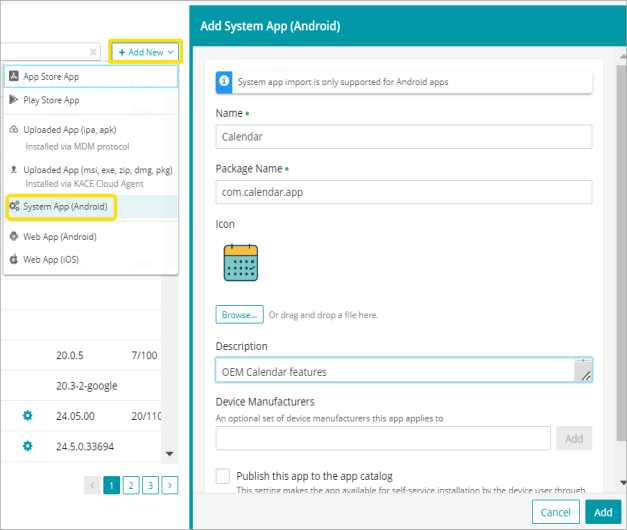
Our new System Apps for Android feature lets administrators control the visibility of manufacturer-specific (OEM) apps in the work profile of personal Android devices. It allows an OEM app to be treated just like managed Play Store apps, which means data is stored in the work profile and automatically removed when the device is unenrolled.
The new Web Apps feature provides a seamless way to connect end users with key company websites. Admins can create and configure iOS and Android Web app shortcuts that can be assigned to devices and used in the same way as standard apps.
And as part of our ongoing effort to improve the end user experience, we’re releasing new maintenance window notifications in the product UI, as well as an updated user experience when adding Android apps from the Google Managed Play Store to KACE Cloud MDM.
Features
System Apps for Android
The System Apps for Android feature was built for admins who need to be able to make an OEM built-in app available in a work profile. Any built-in app included by a device manufacturer can be turned on by default, appearing the same way other company-approved apps do on devices.
We do advise checking the Google Play Store for the system app first. If the app is there, downloading through the Play Store will enable updating and/or managed configuration. When adding a system app through KACE Cloud, an admin will need to locate a package name for a specific app. We recommend starting at the device manufacturer’s website.
Learn more about system apps for Android.
Web Apps
Admins can now create iOS and Android web apps in KACE Cloud MDM. Our new feature lets an admin set the URL, icon, and display mode features for a new user-facing web app. The apps are then saved in the App Library in KACE Cloud and can be deployed to any devices. Note that Web apps are not yet supported for macOS or tvOS.
_897x600.png)
Learn more about Android and iOS App Management.
Usability Enhancements
Google Play Store Update
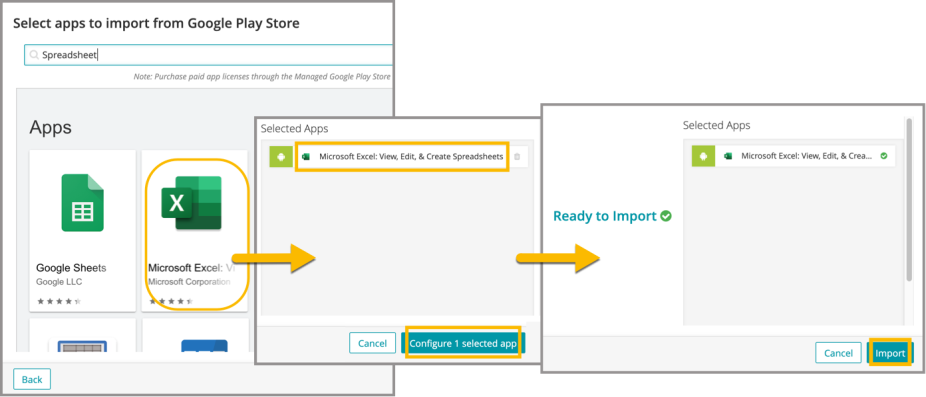
We’ve created a simplified workflow with a cleaner look and feel that makes adding Android apps a smoother experience for our end users. In one linear process, you can choose the Google Play Store, choose your app(s), configure permissions, then approve and import.
Learn more about app management functionality.
Maintenance Notifications in UI
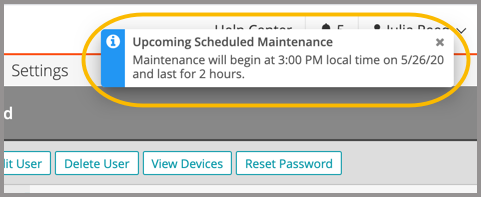
New maintenance notifications will appear in the product UI at a 7-day and 1-hour interval leading up to our monthly maintenance and release. We want to ensure that our end users are never caught off guard due to a maintenance window and can plan accordingly for a brief period of downtime. Each of the notifications is a one-time alert and can be easily dismissed.
Learn more about alerts and notifications.
Resolved Issues
Bug fixes are included in the resolved issues list for two release periods and are then retired.
| Issue | Description | Status |
| ESMCL- 4041 Incorrect device history when installing apps across different operating systems | When device history shows an "installing application" record for the app, no additional history is included. | FIXED |
| ESMCL- 4031 App list when importing to device does not show app configs | The list of apps available for adding includes one item for every App + App Config combination. | FIXED |
| ESMCL- 3852 Clearing search filter on users page does not update results | The user list updates to show all users and not just the ones that match the search. | FIXED |
| ESMCL- 3507 Device History does not show the installation of Android Options | Device History screen shows the installation of the android options configuration | FIXED |
Known Issues
Additional Resources
Getting Started with KACE Cloud MDM
© 2020 Quest Software Inc.
ALL RIGHTS RESERVED.
This guide contains proprietary information protected by copyright. The software described in this guide is furnished under a software license or nondisclosure agreement. This software may be used or copied only in accordance with the terms of the applicable agreement. No part of this guide may be reproduced or transmitted in any form or by any means, electronic or mechanical, including photocopying and recording for any purpose other than the purchaser’s personal use without the written permission of Quest Software Inc.
The information in this document is provided in connection with Quest Software products. No license, express or implied, by estoppel or otherwise, to any intellectual property right is granted by this document or in connection with the sale of Quest Software products. EXCEPT AS SET FORTH IN THE TERMS AND CONDITIONS AS SPECIFIED IN THE LICENSE AGREEMENT FOR THIS PRODUCT, QUEST SOFTWARE ASSUMES NO LIABILITY WHATSOEVER AND DISCLAIMS ANY EXPRESS, IMPLIED OR STATUTORY WARRANTY RELATING TO ITS PRODUCTS INCLUDING, BUT NOT LIMITED TO, THE IMPLIED WARRANTY OF MERCHANTABILITY, FITNESS FOR A PARTICULAR PURPOSE, OR NON-INFRINGEMENT. IN NO EVENT SHALL QUEST SOFTWARE BE LIABLE FOR ANY DIRECT, INDIRECT, CONSEQUENTIAL, PUNITIVE, SPECIAL OR INCIDENTAL DAMAGES (INCLUDING, WITHOUT LIMITATION, DAMAGES FOR LOSS OF PROFITS, BUSINESS INTERRUPTION OR LOSS OF INFORMATION) ARISING OUT OF THE USE OR INABILITY TO USE THIS DOCUMENT, EVEN IF QUEST SOFTWARE HAS BEEN ADVISED OF THE POSSIBILITY OF SUCH DAMAGES. Quest Software makes no representations or warranties with respect to the accuracy or completeness of the contents of this document and reserves the right to make changes to specifications and product descriptions at any time without notice. Quest Software does not make any commitment to update the information contained in this document.
If you have any questions regarding your potential use of this material, contact:
Quest Software Inc.
Attn: LEGAL Dept.
4 Polaris Way
Aliso Viejo, CA 92656
Refer to our website (www.quest.com) for regional and international office information.
Patents
Quest Software is proud of our advanced technology. Patents and pending patents may apply to this product. For the most current information about applicable patents for this product, please visit our website at www.quest.com/legal.
Trademarks
Quest and the Quest logo are trademarks and registered trademarks of Quest Software Inc. in the U.S.A. and other countries. For a complete list of Quest Software trademarks, please visit our website at www.quest.com/legal. All other trademarks, servicemarks, registered trademarks, and registered servicemarks are the property of their respective owners.